The Akai MPC is the most influential beat-making instrument ever created. From the dusty samples of golden-era hip-hop to modern trap and electronic music, the MPC workflow has shaped how producers think about rhythm and sampling. Today's lineup spans three hardware generations – this guide breaks down each model to help you find the right one.
A Brief History of the MPC
The MPC story begins with Roger Linn, the engineer behind the legendary LinnDrum. In 1988, Linn partnered with Akai to create the MPC60 – the first Music Production Center. It combined a sampler, sequencer, and those iconic velocity-sensitive pads in one instrument.
The MPC60's swing timing became its secret weapon. Producers discovered that the MPC's particular interpretation of swing gave beats a human feel that other machines couldn't replicate. This timing, sometimes called "MPC swing" or "the MPC bounce," became foundational to hip-hop production.
Key MPC milestones:
- 1988 – MPC60 launches, defines the workflow
- 1994 – MPC3000 becomes the hip-hop standard
- 2000 – MPC2000XL dominates studios worldwide
- 2012 – MPC Renaissance brings MPC workflow to software
- 2017 – MPC X and MPC Live launch – first standalone touchscreen MPCs
- 2020 – MPC One (January) and MPC Live II (May) expand the range
- 2022 – MPC Key 61 adds keyboard integration
- 2023 – MPC X SE and MPC One+ celebrate the 35th anniversary
- 2024 – MPC Key 37 offers compact keyboard option
- 2025 – MPC Live III introduces Gen 2 hardware (8-core CPU, MPCe pads)
- 2026 – MPC XL becomes the most powerful MPC ever made
Throughout this evolution, the core workflow remained: sample, chop, sequence, swing. Modern MPCs run sophisticated software (currently at version 3.x) but the philosophy stays true to Roger Linn's original vision.
Understanding the Hardware Generations
The current MPC lineup spans three hardware generations. This matters more than any other spec:
Gen 1: Quad-Core / 2GB RAM / Standard Pads
Models: Akai MPC One+, Akai MPC Live II~£517 used
- 1.8GHz quad-core ARM Cortex A17 processor
- 2GB RAM
- Standard velocity-sensitive pads
- Full MPC software capability but limited plugin headroom
These handle core beat-making excellently but run out of steam with heavy plugin use or large sample libraries.
Gen 1.5: Quad-Core / 4GB RAM / Standard Pads
Models: Akai MPC X SE~£991 used
- 1.8GHz quad-core ARM Cortex A17 processor
- 4GB RAM (double Gen 1)
- Standard velocity-sensitive pads
- Better plugin headroom than Gen 1
The doubled RAM helps significantly with built-in plugins and larger projects.
Gen 2: 8-Core / 8GB+ RAM / MPCe 3D Pads
Models: Akai MPC Live 3, Akai MPC XL~£1870 used
- 8-core Gen 2 processor (4x the power of Gen 1)
- 8GB RAM (Live 3) or 16GB RAM (XL)
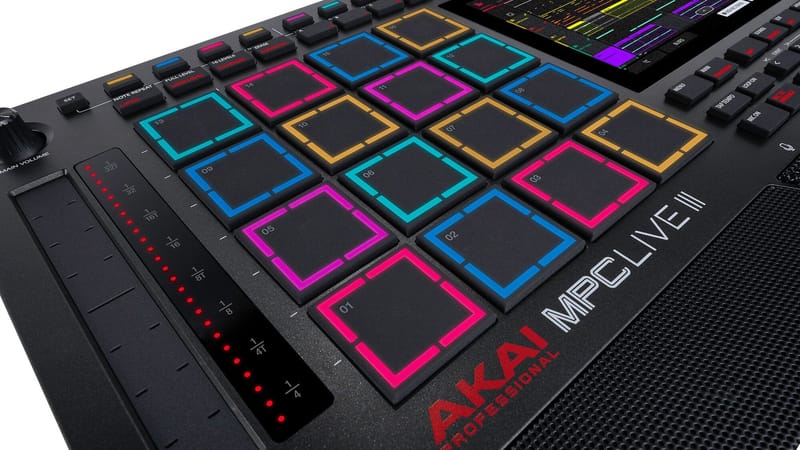
- MPCe pads with 3D-Sensing Technology – revolutionary new pad design
- Handles 32 plugins, 16 audio tracks, 256 voices simultaneously
Gen 2 is a massive leap. The MPCe pads divide each pad into four quadrants, sensing velocity, pressure, aftertouch, and X/Y movement – similar to MPE controllers like Roli Seaboard or Ableton Push 3.
The Current MPC Lineup
Gen 2 Flagship Models
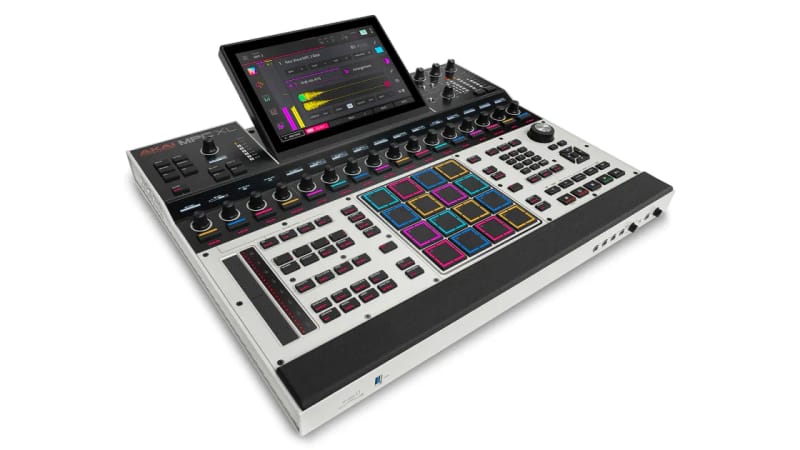
Akai MPC XL~£1870 used – 10.1" tiltable screen, 16GB RAM, 256GB storage, 16 CV/Gate – £2,499 new The ultimate MPC. Most powerful standalone production centre ever made.
Akai MPC Live 3 – 7" screen, 8GB RAM, 128GB storage, battery, speakers – £800-1000 used Portable Gen 2 power. Same 8-core CPU and MPCe pads as XL.
Gen 1.5 Studio Models
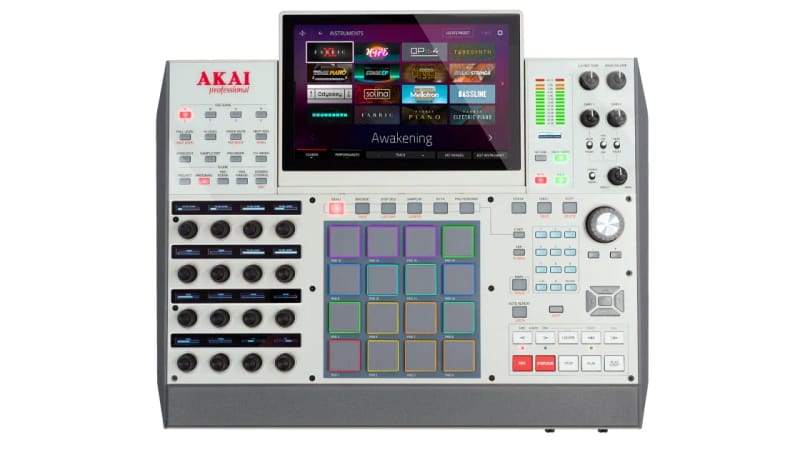
Akai MPC X SE~£991 used – 10.1" screen, 4GB RAM, 48GB storage, 16 Q-Links – £1200-1600 used Previous flagship. 16 Q-Links for hands-on mixing. Now superseded by XL.
Akai MPC Key 61~£744 used – 10.1" screen, 4GB RAM, 61 full keys – £1200-1500 used Full-size keyboard with MPC workflow.
Akai MPC Key 37~£427 used – 7" screen, 4GB RAM, 37 mini keys – £600-800 used Compact keyboard MPC.
Gen 1 Entry Models
Akai MPC One+ – 7" screen, 2GB RAM, CV/Gate, no battery – £400-500 used Budget standalone entry point.
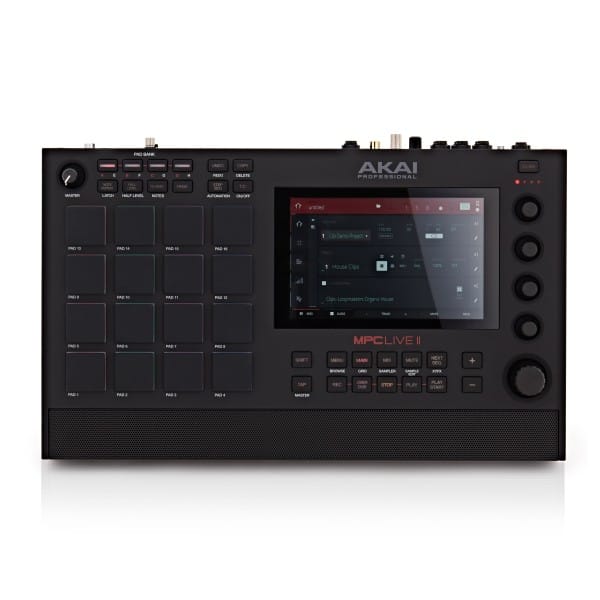
Akai MPC Live II~£517 used – 7" screen, 2GB RAM, battery, speakers – £500-650 used Portable but older generation.
Alternative Workflow
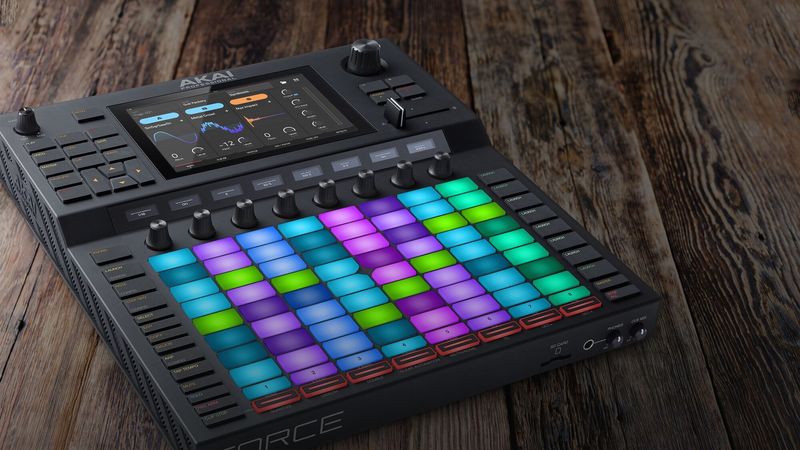
Akai Force~£443 used – 7" screen, 8x8 clip matrix, 8 Q-Links – £800-1100 used Clip-launching workflow (like Ableton), not traditional MPC sequencing.
MPC XL: The Ultimate Flagship
The MPC XL launched at NAMM 2026 as Akai's most powerful MPC ever – and it's not close.
Key Specs
- 8-core Gen 2 processor – same as Live 3, 4x previous generation
- 16GB RAM – double the Live 3, handles massive projects
- 256GB internal SSD – room for huge sample libraries
- 10.1" HD touchscreen with adjustable tilt – studio ergonomics
- 16 MPCe pads with 3D-Sensing Technology
- 16 CV/Gate outputs – extensive modular integration
- 8 line outputs – full mixer replacement
What Makes It Special
The XL isn't just a bigger X SE – it's a generational leap. The 8-core processor and 16GB RAM handle workloads that would choke older MPCs. The MPCe pads introduce expressive control previously impossible on an MPC, with four quadrants per pad sensing movement in multiple dimensions.
The 16 CV/Gate outputs make it the most modular-friendly MPC ever, and the tiltable screen addresses ergonomic complaints about previous flat-panel designs.
Who It's For
The XL suits serious studio producers who want the absolute best and have the budget. It's overkill for basic beat-making but justified if you're running complex projects with multiple plugins, large sample sets, and modular integration.
Best for: Professional studios, complex hybrid setups, producers who push hardware limits
Skip if: You need portability, or your projects don't demand this much power
MPC Live 3: Portable Gen 2 Power
The MPC Live III (Live 3) brought Gen 2 hardware to a portable format – the same 8-core processor and MPCe pads as the XL, with battery power.
Key Specs
- 8-core Gen 2 processor – 4x the power of Live II
- 8GB RAM – handles 32 plugins, 16 audio tracks, 256 voices
- 128GB internal storage + 30GB factory content
- 7" multi-touch display
- 16 MPCe pads with 3D-Sensing Technology
- 8 CV/Gate outputs – modular integration
- Built-in speakers and condenser mic
- Rechargeable battery – 4+ hours
- WiFi and Bluetooth connectivity
Live 3 vs Live II: A Generational Leap
This isn't an incremental upgrade – it's a different class of machine:
- 4x processing power (8-core vs quad-core)
- 4x RAM (8GB vs 2GB)
- 8x storage (128GB vs 16GB)
- MPCe pads vs standard pads
- 8 CV/Gate vs 4 CV/Gate
The Live II is still a capable beat-maker, but the Live 3 handles workloads that would crash the older model.
Who It's For
The Live 3 is the sweet spot for most producers in 2026. You get Gen 2 power with portability – make beats anywhere, then connect to a studio setup when needed. The MPCe pads and 8GB RAM future-proof your investment.
Best for: Mobile producers, bedroom beatmakers, anyone wanting Gen 2 power without desktop commitment
Skip if: You never leave the studio and want maximum I/O (get the XL)
MPC X SE: The Previous Flagship
The MPC X SE was the flagship before the XL arrived. It's still excellent but now sits in an awkward position – Gen 1.5 hardware at near-XL prices.
Key Specs
- 1.8GHz quad-core processor – Gen 1.5
- 4GB RAM – double the One+/Live II
- 48GB internal storage
- 10.1" multi-touch display
- 16 Q-Link knobs – still unmatched for hands-on control
- Standard pads (not MPCe)
- CV/Gate outputs
- 4 audio inputs, 6 outputs
The X SE Dilemma
The X SE's 16 Q-Links remain its killer feature – no other MPC offers this level of hands-on control. But you're getting Gen 1.5 internals (quad-core, 4GB, standard pads) while the XL offers Gen 2 (8-core, 16GB, MPCe pads) for roughly £900 more new.
Used X SE prices have dropped since the XL announcement, making them better value. But if you're buying new and can stretch to the XL, the generational improvements are substantial.
Who It's For
The X SE now suits budget-conscious studio producers who want 16 Q-Links but can't justify XL pricing. Buy used for best value.
Best for: Producers who prioritise Q-Link control, used buyers seeking value
Skip if: You can afford the XL or want MPCe pads
MPC Live II: The Budget Portable
The MPC Live II offers portable MPC production at entry-level pricing. It's Gen 1 hardware but handles core beat-making well.
Key Specs
- 1.8GHz quad-core processor – Gen 1
- 2GB RAM – adequate for basic projects
- 16GB internal storage
- 7" multi-touch display
- Standard pads – still excellent quality
- Built-in speakers
- Rechargeable battery – 6 hours
- 4 CV/Gate outputs
Live II vs Live 3
The Live II costs significantly less used (£500-650 vs £800-1000) but you're getting:
- Quarter the processing power
- Quarter the RAM
- Standard pads vs MPCe
- Older generation throughout
For straightforward beat-making – chopping samples, programming drums, basic arrangements – the Live II is perfectly capable. You'll hit limits with heavy plugin use or complex projects.
Who It's For
The Live II is the best budget portable MPC. If you want to make beats on the go without spending Live 3 money, it delivers the core experience.
Best for: Budget-conscious producers, first-time MPC buyers, simple beat-making workflows
Skip if: You rely heavily on plugins or expect to grow into complex projects
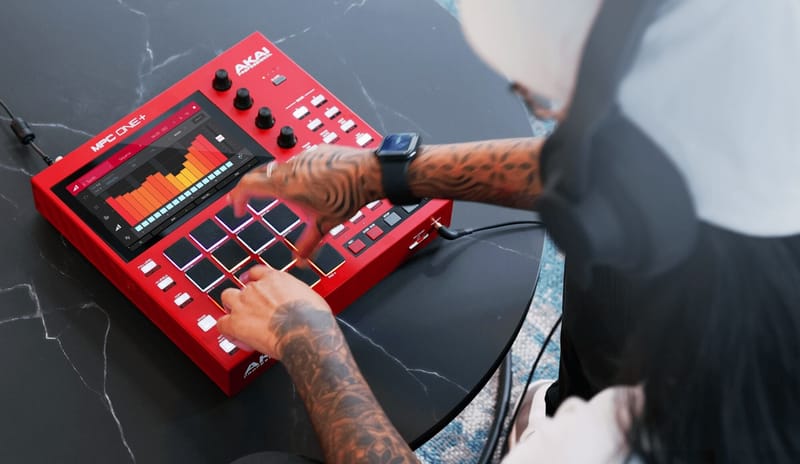
MPC One+: Desktop Entry Point
The MPC One+ is the cheapest way into standalone MPC production. No battery, no speakers – just the essentials.
Key Specs
- 1.8GHz quad-core processor – Gen 1
- 2GB RAM – same as Live II
- 16GB internal storage (up from 4GB on original One)
- 7" multi-touch display
- Standard pads
- CV/Gate outputs – modular integration at entry price
- WiFi and Bluetooth – added in One+
- SD card and USB storage
One vs One+
The One+ added WiFi, Bluetooth, and a speaker output jack. Same CPU, same RAM. If buying used, either works – the additions are convenient but not essential.
Who It's For
The One+ suits desktop producers who don't need portability. You get the same MPC software as the XL at a fraction of the price. The CV/Gate outputs make it attractive for modular integration.
Best for: Home studio producers, budget-first buyers, modular/hybrid setups
Skip if: You want to produce away from your desk
Akai Force: The Clip-Launch Alternative
The Force isn't really an MPC – it uses clip-launching workflow like Ableton Live.
Key Specs
- 1.8GHz quad-core processor
- 4GB RAM
- 7" multi-touch display
- 8x8 RGB clip matrix – 64 pads for clip launching
- 8 Q-Link knobs
- Crossfader – DJ-friendly
- 4 audio inputs, 4 outputs
Force vs MPC Workflow
The Force launches clips non-linearly rather than sequencing patterns. Think Ableton Push, not MPC. Better for:
- Live performance and arrangement
- DJ-style transitions
- House, techno, electronic music
Worse for:
- Traditional MPC chopping
- Linear hip-hop production
- Sample-based beat-making
Who It's For
The Force suits live performers and producers who think in clips. If you've used Ableton's Session View and want that workflow standalone, the Force delivers.
Best for: Live electronic performance, DJ/producer hybrids
Skip if: You want traditional MPC workflow
MPC Key 37/61: Keyboard Integration
The MPC Key models add piano keys to MPC workflow.
Key 37 vs Key 61
- Key 37 – 7" screen, 37 mini keys, 4GB RAM, more portable
- Key 61 – 10.1" screen, 61 full-size keys, 4GB RAM, flagship keyboard experience
Both are Gen 1.5 (quad-core, 4GB RAM, standard pads). They include dedicated instrument engines that shine with keyboard playing: Hype, Electric, Bassline, Tubesynth.
Who They're For
Keyboard players who want integrated keys rather than external MIDI controllers.
Skip if: You don't play keys or prefer separate MIDI keyboards
Quick Comparison: Which Generation?
Buy Gen 2 (Live 3, XL) if:
- You run multiple plugins simultaneously
- You want MPCe pads with 3D expression
- You're building a setup to last years
- Complex projects with lots of tracks
Buy Gen 1.5 (X SE, Keys) if:
- You want 16 Q-Links (X SE only)
- You're buying used at good prices
- Moderate plugin use
- You play keys (Key models)
Buy Gen 1 (One+, Live II) if:
- Budget is primary concern
- Simple beat-making focus
- Learning the MPC workflow
- Mostly sampling and chopping
Expansion Packs Worth Considering
F9 Instruments – Premium synth and sample instruments, strong for electronic music
MSX Audio – Vintage hardware emulations and drum machines
Akai Factory Expansions – Official packs, quality varies
Decap - Drums That Knock – Industry-standard drum kits (load as samples)
Rawcutz – Vinyl-sourced sample packs
Used Buying Tips
- Check the generation – Gen 2 (Live 3, XL) has different capabilities than Gen 1
- Pad condition – Press each pad, check for dead or sticky responses
- Screen condition – Dead pixels or touch issues are expensive to fix
- Battery health (Live models) – Ask about charge capacity
- Firmware version – Ensure it runs current MPC 3.x software
Current Used Prices (UK, 2026)
- MPC One / One+: £400-500
- MPC Live II: £500-650
- MPC Live 3: £800-1000
- MPC Key 37: £600-800
- MPC Key 61: £1200-1500
- MPC X SE: £1200-1600
- MPC XL: £1800-2200 (limited used availability)
- Force: £800-1100
The Verdict
For most producers in 2026, the MPC Live 3 is the best choice. Gen 2 hardware (8-core, 8GB RAM, MPCe pads) with portability at a reasonable price. It handles everything from basic beats to complex productions.
Buy the MPC XL if you're studio-based, want maximum power, and can justify the flagship price. The 16GB RAM and 16 CV/Gate outputs make it a genuine studio centrepiece.
Buy the MPC X SE used if you need 16 Q-Links and find a good price. It's excellent hardware, just superseded by the XL.
Buy the MPC One+ or Live II if budget is tight. Gen 1 handles core MPC workflow perfectly – you'll just hit limits with complex projects.
Buy the Force only if you specifically want clip-launching. It's not an MPC despite the Akai badge.
Whichever you choose, you're getting that legendary MPC workflow that's shaped music production for nearly four decades.